
Save, reopen, and recover a project
Keep editable settings, relink moved source videos, and recover unsaved changes.
Before you begin: An analysed clip · original video retained
Follow the steps
Save an editable project.
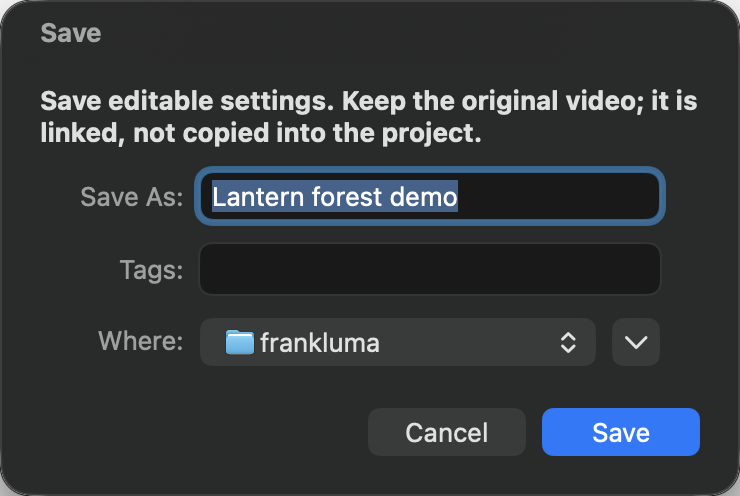
Choose Save Project (⌘S). Name the
.franklumafile and choose a location. It stores scene cuts, references, correction settings, export options, current frame and preview mode. The original video is linked, not copied into the project.Keep the source beside your project.
Keep the video available and unchanged. The project contains its source path, identity fingerprint and macOS access bookmark, but neither media nor cached frame analysis. For handoff, send both the video and project. Project files can expose source filenames/paths and editing settings.
Create a second editing version.
Choose Save Project As… (⇧⌘S) for a separately named version. It becomes the active save destination; later Save Project updates that copy. Exporting a corrected movie does not save editable settings.
Reopen and wait for analysis.
Choose Open Project… (⇧⌘O), open it in Finder, or drop it on FrankLuma. The app checks the source and repeats analysis and reference measurements before restoring edits. Invalid projects, source mismatch or cancelled analysis leave the current session intact.
Relink an identical moved file.
macOS bookmarks may follow a moved source. If the file cannot be found, locate it when prompted, or use File → Relink Source Video…. Choose the original or a byte-identical copy. A transcode or modified video does not match the fingerprint; begin a fresh session for a changed source.
Recover after an interruption.
On launch, choose Recover, Keep for Later or Discard for an offered local checkpoint. File → Recover Unsaved Session opens the newest checkpoint; others remain available afterward. Recovery needs the source and repeats analysis. A recovered session is unsaved, so use Save Project to keep it.
Check saving before leaving.
Unsaved changes are checkpointed locally after a brief delay, separately for each session. If a recovery-write failure appears in the footer, use Save Project. A successful save or deliberate closure/discard removes that session’s checkpoint. Keep for Later retains it. Closing with unsaved changes offers Save Project, Discard Changes or Cancel.
Keep a complete backup
Back up both .frankluma and its exact source video. The project alone cannot render your film. Diagnostics are useful review data but are not a substitute for the editable project or media.
Why relinking can be rejected
FrankLuma checks SHA-256 content identity to avoid applying cuts and measurements to a different video. Even a visually identical re-encode is a different file. Recover the original copy or open the replacement as a new video.